Job log
The Job log is a side panel that lists the jobs that have finished, newest first. Open it with the clock button in the top bar, or press G then J. It is where to look when a job failed and you want to know why; the likely causes are in Troubleshooting.
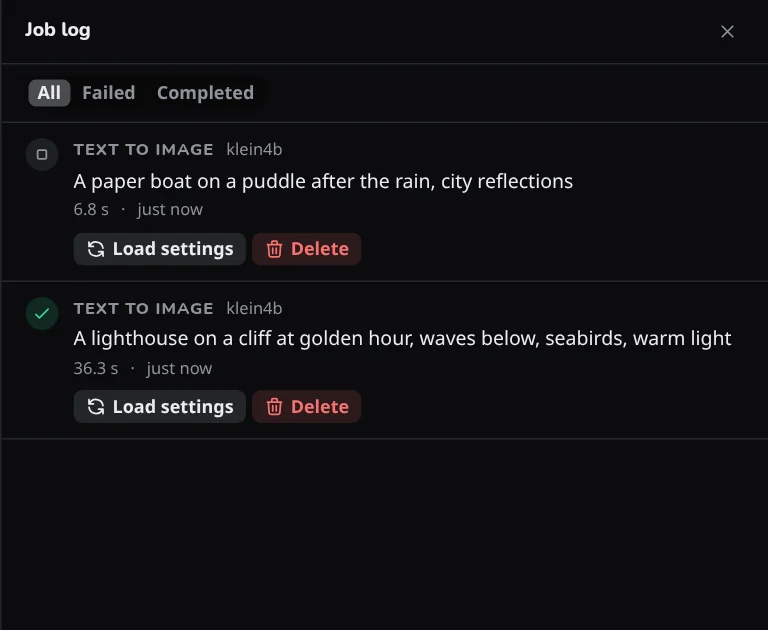
Each row
A row shows the workflow, the model, the first line of the prompt and how long the job took, with a mark for Completed, Failed, Cancelled or Some runs failed. Show details expands a row to the failure text and how many runs failed.
On a phone: the clock button is at the right end of the top strip; see Phones, tablets and other computers.
All, Failed and Completed narrow the list, and older jobs are on further pages.
Actions
- Load settings opens the Workspace with the settings that job used, with the model's defaults around them. It is not offered for an upscale.
- Copy error copies the failure text of a job that has one.
- Delete removes one entry, and Clear log removes the whole log, after asking, under All only.
What is kept
The log is kept in the app database in the data folder, so it survives a restart. Entries stay until you delete them or clear the log. Jobs removed from the queue before they started are not recorded.